<label for=""></label>
- 인라인 요소
- 폼과 관련된 요소에 이름표 지정
- label 요소를 정의함으로써 폼 요소와 연관시킬 수 있음
- <input id="one">의 아이디 값과 <label for="one"> for 값이 동일해야 연결됨
태그의 범위가 크지 않거나 input요소로 감쌀 수 있는 인라인 요소일 때
<h2>연결 방법1</h2>
<p>
  <label>이름: <input type="text"></label>
</p>
태그의 범위가 크거나 특정 태그 사이에 들어갈 수 없어 label 요소로 감쌀 수 없을 때 label for 값과 id값 동일하게 작성.
<h2>연결 방법2</h2>
<table border="1">
  <caption>과일 선택</caption>
  <tr>
    <td><input type="radio" name="choice" id="apple" value="사과"></td>
    <th><label for="apple">사과</label></th>
  </tr>
  <tr>
    <td><input type="radio" name="choice" id="banana" value="바나나"></td>
    <th><label for="banana">바나나</label></th>
  </tr>
</table>
폼 그룹화 태그 fieldset
같은 주제를 가지고 있는 폼 관련 요소를 구분지을 때 사용
fieldset 요소의 제목: legend
fieldset 요소 안에 작성되어야 하며 하나의 fieldset 안에 한번만 사용
<form>
  <fieldset disabled>
    <legend>회원가입</legend>
    <p>
      <label for="userName">이 름 :</label>
      <input type="text" name="user_name" id="userName" placeholder="이곳에 이름을 작성하세요" required>
    </p>
    <p>
    <label for="userEmail">이메일 :</label>
      <input type="eamil" name="user_email" id="userEmail">
    </p>
    <p>
    <label for="cellPhone">휴대폰 :</label>
      <input type="tel" name="cell_phone" id="cellPhone">
    </p>
    <button type="submit">가입</button>
    <button type="reset">취소</button>
  </fieldset>

  <fieldset>
    <legend>약관</legend>
    <textarea name="약관" id="txtBox">이 안의 내용은 약관을 설명한 글입니다...</textarea>
    <textarea name="약관" id="txtBox" placeholder="사용자에게 힌트를 줍니다"></textarea>
  </fieldset>
</form>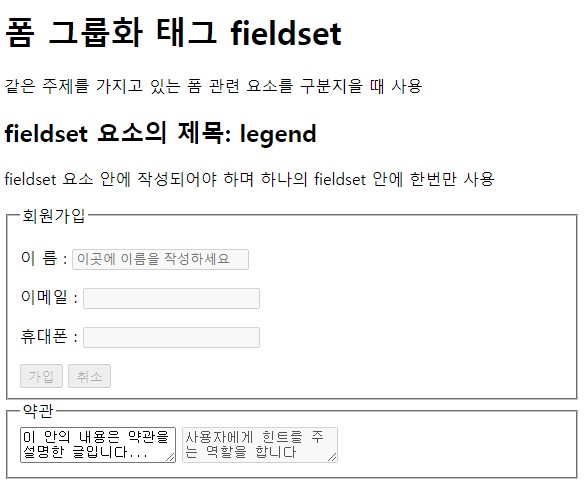
'HTML5' 카테고리의 다른 글
| [HTML5] meta 태그 관련 (0) | 2022.09.30 |
|---|---|
| [HTML5] video, audio 태그 (0) | 2022.09.30 |
| [HTML5] <form> 태그와 관련 태그, 속성들 (0) | 2022.09.29 |
| [HTML5] 표 태그 <table> / 셀 병합 속성 colspan, rowspan (0) | 2022.09.28 |
| [HTML5] 이미지 태그 <img> / 독립적 콘텐츠 태그 <figure> (0) | 2022.09.27 |